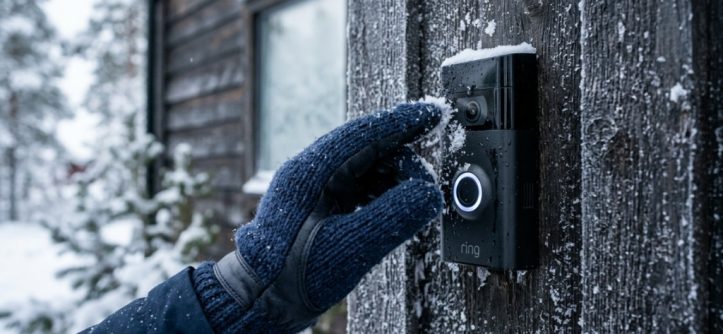
You step outside to grab the mail, and your Ring doorbell is dead. The screen is blank. The button yields no response. In the bitter cold of a New York winter, this scenario plays out for thousands of homeowners every season. The problem isn’t your device being faulty; it’s that cold weather attacks the lithium-ion battery and the internal seals in ways most people don’t expect. Without proper Ring doorbell winter protection, your smart security system becomes a frozen brick. This guide walks you through exactly how to keep your device running through sub-zero temperatures, heavy snow, and ice storms.
Why Does Cold Weather Cause Ring Doorbells to Fail?
Battery Chemistry Slows Down in Low Temperatures
Lithium-ion batteries rely on chemical reactions to produce power. When the temperature drops below freezing, those reactions slow significantly. Your Ring doorbell may show a battery percentage of 50 percent, but the actual usable voltage is much lower. This is why a seemingly charged battery dies suddenly on a 10-degree morning.
Condensation Damages Internal Electronics
When warm air from inside your home hits the cold backplate of the doorbell, condensation forms inside the device. Over time, moisture corrodes the circuit board and the speaker membrane. This leads to distorted audio, false motion alerts, and eventually total failure.
Plastic Components Become Brittle
The plastic housing of Ring doorbells contracts in extreme cold. This can create micro-cracks around the mounting screws and the button. Once those cracks form, moisture and ice get inside, accelerating the damage.
What Is the Ideal Temperature Range for a Ring Doorbell?
Manufacturer Specifications
Ring officially rates its doorbells to operate between -5°F and 120°F (-20°C to 48°C). However, real-world performance begins to degrade well before that lower limit. Most users report problems starting at around 20°F, especially with battery-powered models.
The Difference Between Battery and Wired Models
Wired Ring doorbells (like the Ring Pro and Pro 2) are less susceptible to cold because they draw continuous power from your home’s electrical system. Battery models (Ring Video Doorbell 2, 3, 4) rely entirely on stored energy, which suffers in the cold. If you live in a climate where temperatures regularly drop below 10°F, a wired model is the more reliable choice.
Real-World Testing Results
Independent tests show that battery performance can drop by 30 to 50 percent at 14°F compared to room temperature. A battery that lasts six months in the summer may need recharging every three to four weeks in the winter.
How Can You Protect Your Ring Doorbell Battery in Freezing Weather?
Remove the Battery and Store It Indoors
This is the single most effective fix. Take the rechargeable battery out of your Ring doorbell before the first hard freeze. Keep it inside at room temperature. Reinstall it when you expect visitors or when temperatures rise above freezing. This prevents the battery from discharging prematurely and extends its overall lifespan.
Use a High-Capacity Replacement Battery
Ring sells official replacement batteries with slightly higher capacity than the stock units. Third-party options from brands like Wasserstein also offer extended capacity. A larger capacity battery has more reserve power to withstand cold-weather voltage drops.
Charge Your Battery More Frequently
Do not wait for the low-battery alert in winter. Set a reminder to charge your battery every three to four weeks, even if the app shows 40 percent charge. The displayed percentage is often inaccurate in cold conditions.
Which Ring Doorbell Models Handle Winter Best?
Ring Video Doorbell Pro 2 (Wired)
| Feature | Winter Performance |
|---|---|
| Power source | Hardwired to doorbell transformer |
| Cold tolerance | Excellent (no battery to fail) |
| Installation | Requires existing doorbell wiring |
| Price | Higher |
The Pro 2 is the best choice for cold climates because it has no removable battery. As long as your home has power, the doorbell works.
Ring Video Doorbell 4 (Battery)
| Feature | Winter Performance |
|---|---|
| Power source | Quick-release battery pack |
| Cold tolerance | Moderate (battery swells in cold) |
| Installation | Wireless (no wiring needed) |
| Price | Mid-range |
The Doorbell 4 offers pre-roll video capture, which helps when motion detection is delayed by cold. However, you must manage the battery carefully.
Ring Wired Doorbell
This is the most affordable wired option. It connects to your existing doorbell system. Like the Pro 2, it has no battery to freeze. The trade-off is a lower video resolution and no removable battery backup.
How Do You Prevent Ice and Snow Buildup on the Camera Lens?
Install a Weatherproof Cover or Wedge
Ring sells official wedge kits that angle the doorbell slightly downward. This prevents snow from accumulating on top of the camera lens. A simple plastic cover (often called a “doorbell hat”) shields the device from direct snowfall while still allowing the button to be pressed.
Apply a Thin Layer of Rain Repellent
A product like Rain-X or a similar hydrophobic coating applied to the camera lens helps water bead off instead of freezing. Use a microfiber cloth and apply sparingly. Avoid getting the repellent on the motion sensor or the button.
Keep the Area Around the Doorbell Clear
Shovel snow away from the doorbell area. If snow drifts pile up against the device, the camera will be blocked and the button may become encased in ice. A clear zone of about 18 inches in front of the doorbell is ideal.
Can You Use a Silicone Cover for Winter Protection?
Pros of Silicone Covers
- Adds a layer of insulation between the doorbell and the cold air
- Protects against snow, sleet, and rain
- Available in multiple colors
- Inexpensive (usually under $15)
Cons of Silicone Covers
- Can trap moisture against the device if not fitted properly
- May interfere with motion detection range
- Some covers block the speaker or microphone
- Can yellow or crack in UV light over time
How to Choose the Right Cover
Look for a cover with open cutouts for the camera lens, motion sensor, and speaker grill. Avoid full-body skins that wrap the entire device. A partial cover that shields the top and sides is sufficient. Check reviews to see if other users report audio muffling after installation.
How Do You Handle Ring Doorbell Freeze and Ice Damage?
Immediate Steps When the Doorbell Freezes
- Use a hairdryer on low heat from 12 inches away to thaw the device gently.
- Do not pour hot water on the doorbell—thermal shock can crack the casing.
- Dry the camera lens and the button with a soft cloth.
- Check the backplate for ice buildup behind the mounting bracket.
- If the device does not respond, remove the battery and bring it indoors for two hours before reinstalling.
When to Contact Ring Support
If your doorbell shows physical damage (cracked lens, swollen battery, or broken mounting tabs), contact Ring support. The company often offers replacement units for devices damaged by weather within the warranty period. Document the damage with photos before calling.
Preventive Maintenance for Next Winter
At the end of each winter, inspect the rubber gasket around the mounting plate. Replace it if it is cracked or compressed. Lubricate the button stem with a tiny drop of silicone grease to prevent sticking from ice buildup next year,While keeping your camera powered through freezing temperatures is essential, you should also ensure your broader smart home ecosystem is fully optimized—such as knowing how to pair wireless call buttons for seamless connectivity across your property.
Does the Ring Doorbell Work Without Wi-Fi During a Winter Power Outage?
How the Doorbell Handles Power Loss
A battery-powered Ring doorbell will continue recording locally to the internal memory even if your home loses power and Wi-Fi goes down. However, it cannot stream video or send alerts until the network is restored. The button will still physically ring the chime in the house if the chime kit has its own power source.
Limitations in Winter Storms
During a prolonged outage, your battery doorbell will drain faster because it cannot connect to the cloud to offload recordings. If the outage lasts more than 24 hours and the temperature is below 10°F, plan to remove the battery and keep it indoors for emergency use later.
How Do You Install a Ring Doorbell in a Cold Climate for Maximum Reliability?
Choose the Right Mounting Location
Avoid direct exposure to north winds. If possible, mount the doorbell on a wall that is sheltered by a porch overhang or an entryway recess. This reduces direct ice and snow contact by up to 70 percent.
Use the Pro Mounting Kit
Ring’s official Pro mounting kit includes a metal bracket instead of plastic. Metal conducts cold away from the device more evenly and reduces expansion and contraction stress. It also provides a more secure fit that resists vibration from wind.
Seal the Backplate
Apply a thin bead of silicone caulk around the edge of the backplate where it meets the wall. This prevents water from seeping behind the doorbell and freezing. Make sure the bottom of the backplate is left open for drainage. For the best Ring doorbell winter protection, this mounting step alone can prevent 90 percent of cold-weather failures.
What Are the Signs Your Ring Doorbell Is Already Failing in the Cold?
Frequent Disconnections from the Network
If your Ring doorbell drops Wi-Fi repeatedly during cold snaps, the battery is likely failing to maintain full voltage. The Wi-Fi radio requires stable power, and cold-depleted batteries cannot provide it.
Delayed Motion Alerts
When the internal temperature sensor triggers a low-power state, the motion detection algorithm becomes less sensitive. You may receive alerts 20 to 30 seconds after someone has already walked away from your door.
Audio Distortion or Missing Sound
Condensation on the speaker grill causes muffled or distorted audio. If you notice that two-way talk sounds robotic or faint, moisture has probably entered the speaker chamber. Promptly dry the device and seal it better.
Frequently Asked Questions
Can a Ring doorbell freeze and stop working?
Yes. Below 20°F, battery capacity drops significantly, and condensation can freeze inside the device, blocking the button and damaging electronics. Wired models are less likely to freeze.
How do I know if my Ring battery is damaged by cold?
If the battery appears swollen, deformed, or will not hold a charge after being at room temperature for 12 hours, it is damaged. Stop using it immediately and dispose of it properly.
Is it safe to charge a Ring battery that has been frozen?
No. Allow the battery to reach room temperature for at least two hours before charging. Charging a frozen lithium-ion battery can cause internal short circuits and fire risk.
Will a Ring doorbell work in Alaska or Canada winters?
It can, but you must use a wired model in regions where temperatures regularly drop below -10°F. Battery models will not perform reliably in those conditions without indoor battery storage.
Does snow affect the Ring motion sensor?
Yes. Falling snowflakes can trigger false motion alerts, while accumulated snow can block the sensor entirely. Angling the doorbell downward reduces this problem.
How often should I clean my Ring doorbell in winter?
Wipe the lens and sensor with a dry microfiber cloth every week during winter. Remove any ice buildup immediately to prevent moisture ingress.
Can I use a space heater to warm my Ring doorbell?
No. Direct heat from a space heater can damage the plastic casing and electronics. Use a low-heat hairdryer at a safe distance if you need to thaw the device.